Talk to Your Cabin Crew, In-Flight Entertainment Screens & More

This update is one of the biggest we've ever shipped. You can now actually speak to your cabin crew during the flight, your passengers can watch the journey on a real in-flight entertainment screen, and the AI behind every announcement got a major upgrade — including rare, story-driving moments that turn each flight into something memorable.
Talk to Your Cabin Crew 🎙️
The biggest addition in this release: you can now hold down a key (or a gamepad button) and speak directly to your cabin crew as the captain — out loud, in your own voice. The crew listens, replies through the cabin speakers, and acts on what you said.
Want to ask the crew to start meal service? Tell the passengers there'll be some turbulence ahead? Cancel the duty-free announcement because you're running late? Just press your push-to-talk key and say it.
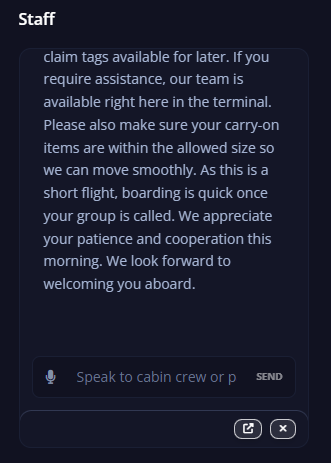
How it works
- Open Settings → Keybindings → Speak to Cabin Crew or Passengers and bind a key or gamepad button you're comfortable holding during a flight.
- During the flight, hold the key, speak naturally, and release it.
- The crew replies a few seconds later, in character and in the right language for your flight.
Two important things you can configure:
- Push-to-talk binding — keyboard shortcut or gamepad button. Hold to record, release to send.
- Auto-send once finished talking — on by default. If you'd rather review (or edit) what was transcribed before it goes to the crew, turn this off and you'll get a quick review bar before each message.
What the crew can actually do
This isn't a chatbot pretending to be a flight attendant. Behind the scenes the AI understands your current flight phase, what's been announced already, what's scheduled next, and the realistic operating context. That means the crew can:
- Reply immediately ("Of course captain, we'll start service right away.")
- Schedule a follow-up announcement for later in the flight ("…and we'll let the passengers know once we reach cruise altitude.")
- Cancel upcoming announcements if you ask — for example, "skip the duty-free pitch on this flight" will quietly remove it from the schedule
- Modify what's already planned — "make the descent announcement shorter, we're behind schedule" and the crew adjusts
- Push back when something doesn't make sense — if you ask for a passenger announcement during taxi-out, the crew might suggest waiting until after takeoff
- Tell the difference between you talking to the crew vs. talking to passengers, and pick the right voice and tone for the reply
You can also leave standing instructions — "keep announcements minimal today, it's a red-eye" — and the crew will remember them for the rest of the flight.
The whole feature is part of the Pro plan.
In-Flight Entertainment Screen ✈️🌍
Cabby now ships with a real in-flight entertainment (IFE) screen that you can open in any browser, on a second monitor, on a tablet propped next to your sim, or even share with friends watching your flight live.
It's the passenger-experience side of Cabby — a beautiful map showing exactly where the flight is right now, where it's going, and how long until arrival.
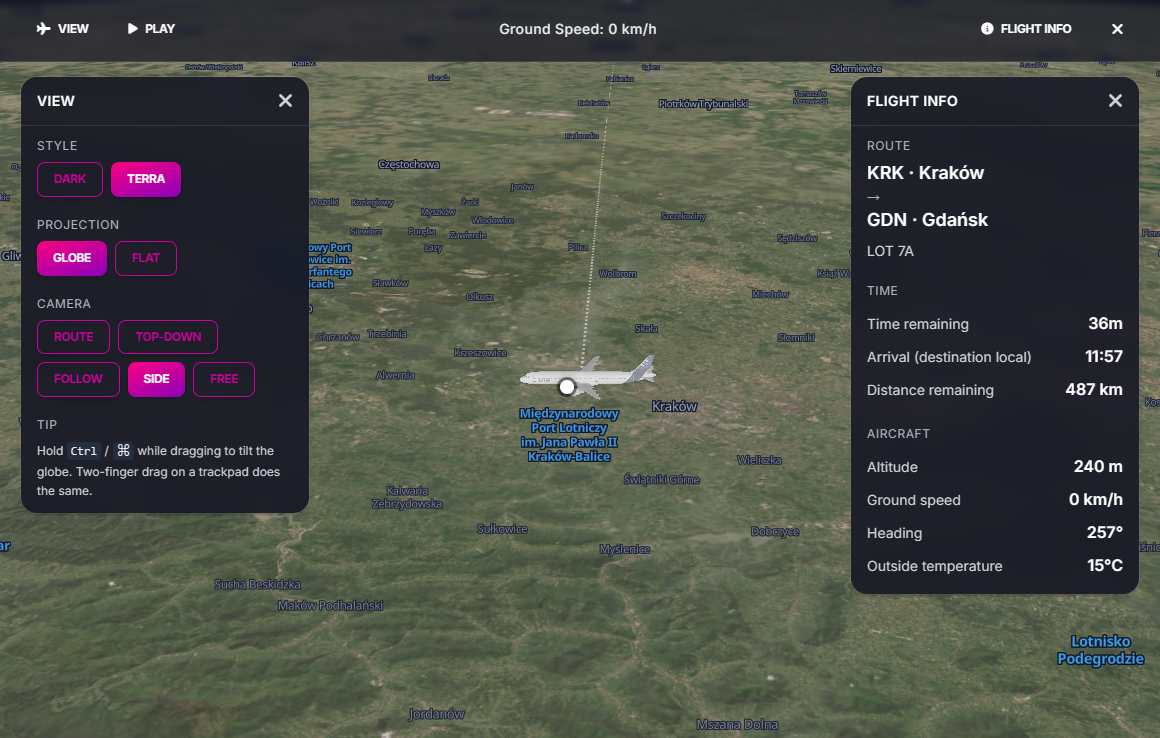
What's on the screen
- Live globe map with your route drawn across it, the flown breadcrumb behind you, and the great-circle path still ahead
- A 3D model of your actual aircraft — Cabby looks up the aircraft type from your sim and renders the right airliner (with sensible fallbacks for less common types)
- Heads-up display showing route, ETA, distance to destination, altitude, ground speed, heading, and outside air temperature
- Day/night terminator painted live across the globe so you can see the sun line move during long-haul flights
- Camera modes — Route overview, Top-down, Follow the aircraft, or Free camera you can spin around yourself
- Auto-cycle "Play" mode that gently rotates through tilt presets and views, perfect for streaming or just letting it run on a side monitor
- Satellite (Terra) view toggle, alongside the regular map style
- Unit toggle — metric or imperial
- Ticker at the top with rolling flight info
How to open it
From the flight page in Cabby, the IFE screen is embedded right there. To open it on a separate device or share it, every flight has its own link of the form flyingart.dev/cabby/screen/flight/<your-flight-id>/ife — open it on a tablet, second monitor, or send it to a friend.
You can also use your personal user link — anyone with that link will always see your current in-progress flight, no matter how many times you fly. Great for streaming or for friends who want to drop in mid-flight.
Boarding Screen Now Lives Online 📺
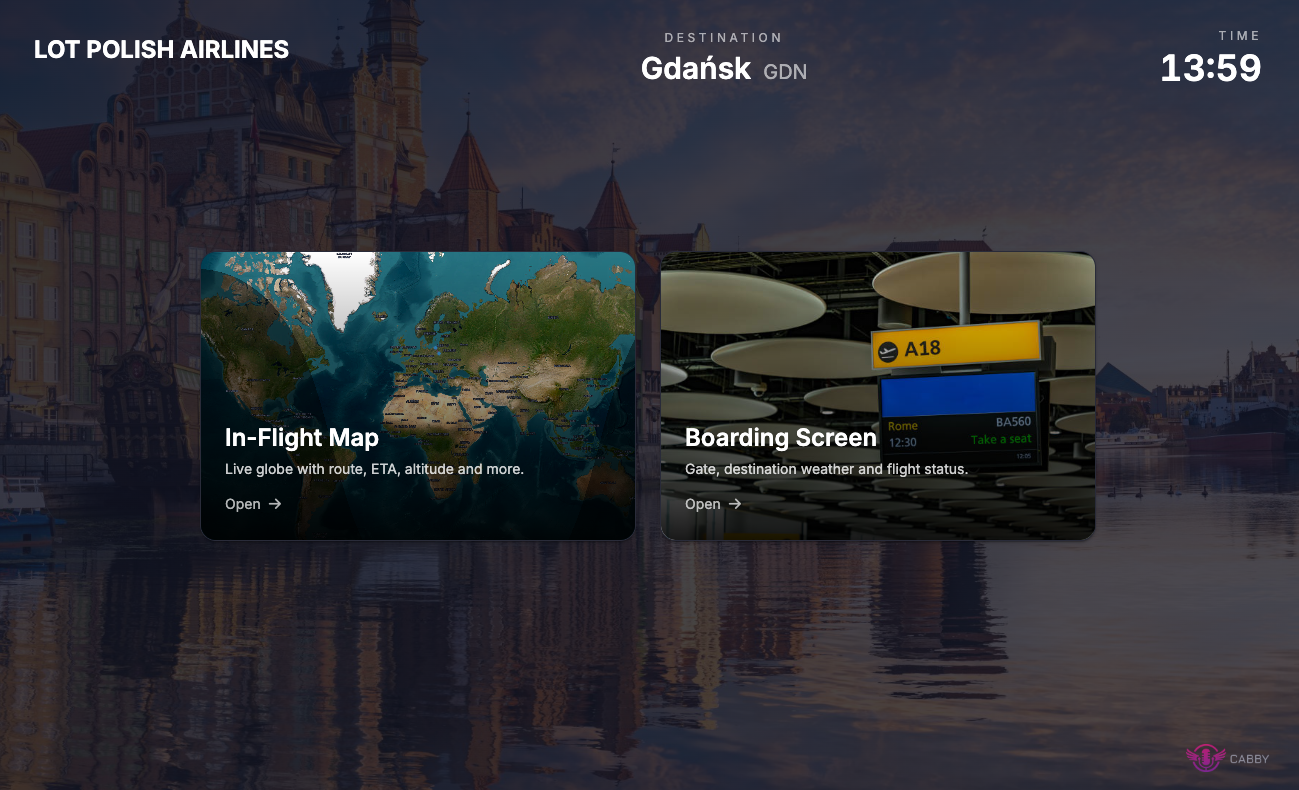
The pre-flight boarding screen — the one that greets your passengers with the airline branding before pushback — has moved into the cloud as well. Same idea as the IFE screen: it lives at a shareable URL, so you can put it on a phone, tablet, or second monitor without any extra setup.
It's the same boarding screen you already know, just easier to put in front of your passengers (real or imaginary).
Smarter, More Surprising Flights 🎲
Every flight in Cabby is unique because the AI generates a fresh set of scenarios for it. This release brings two big improvements there.
Rare flight events
Cabby now occasionally rolls rare, story-driving events into your flight — low-probability moments that turn a routine sector into something you'll remember. Think:
- A passenger celebration on board (birthday, anniversary, honeymoon)
- A polite medical query from the crew
- A scenic point of interest the crew flags for passengers to look out for
- And other one-off moments
These are seeded by the flight, so two flights on the same route won't behave the same way. Most flights will be ordinary; some will have a story.
A smarter announcement engine
Cabby's AI announcement generator was rebuilt under the hood for this release. The result, from a user point of view:
- More coherent flights — announcements remember what was said earlier and build on it instead of repeating themselves
- Better follow-through — if the crew promises to come back with an update later, they actually do
- Tighter timing awareness — the AI now knows exactly when each upcoming announcement is scheduled, so replies and follow-ups land at the right moment
- More natural variety in the captain's cockpit replies, so back-to-back captain announcements no longer sound like the same template
It also runs on a newer, faster model, so generation is quicker — especially noticeable when you're talking to the crew live.
Support ❤️
If you enjoy using Cabby and want to support continued development, consider donating. Your support helps us keep improving and adding new features.
Happy flying! ✈️
Ready to try the new features? Download Cabby and update to the latest version!